Destructuring in JavaScript

What destructuring means
Imagine you ordered a combo meal. Instead of saying "give me the burger from the combo, now give me the fries from the combo, now give me the drink from the combo" you just say "unpack the combo into three things." That's destructuring.
Destructuring is a JavaScript syntax that lets you unpack values from arrays and properties from objects into their own separate variables cleanly, in a single line.
It doesn't change your data. It just gives you a better way to reach into it.
Destructuring Arrays
Before destructuring existed, pulling values out of an array looked like this:
const arr = [10, 20, 30, 40, 50];
const a = arr[0];
const b = arr[1];
const c = arr[2];
It works, but it's repetitive. You're writing arr[index] over and over. Now look at the destructuring version:
const [a, b] = [10, 20, 30, 40, 50];
console.log(a); // 10
console.log(b); // 20
The position of a variable on the left side maps directly to the index in the array. a gets index 0, b gets index 1, and so on. The mapping is positional, the names don't matter, the order does.
The Rest Operator ...
What if you only care about the first two values but still want to hold onto the rest? That's what ...rest is for:
const [a, b, ...rest] = [10, 20, 30, 40, 50];
console.log(a);    // 10
console.log(b);    // 20
console.log(rest); // [30, 40, 50]
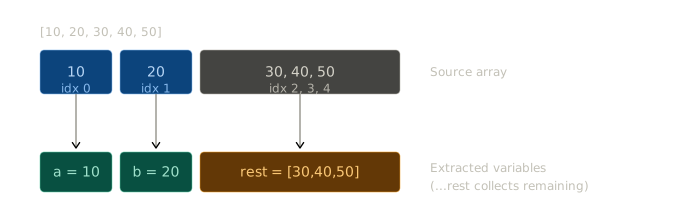
The diagram above shows exactly this, the blue arrows show index-to-variable mapping, and the orange box shows rest collecting everything that's left over.
Object Destructuring
The same idea applies to objects, but with one key difference you use the property name, not a position. Order doesn't matter here; the name is what connects the variable to the right value.
Before destructuring:
const user = { name: "Akhil", age: 21, city: "Blr" };
const name = user.name;
const age  = user.age;
const city = user.city;
After:
const { name, age, city } = user;
console.log(name); // "Akhil"
console.log(city); // "Blr"
Three lines collapsed into one. And since it matches by name, you can write { city, name, age } in any order and it will still work perfectly.
You can also rename a variable while destructuring, which is useful when dealing with API responses that have awkward property names:
const { name: userName, age: userAge } = user;
console.log(userName); // "Akhil"
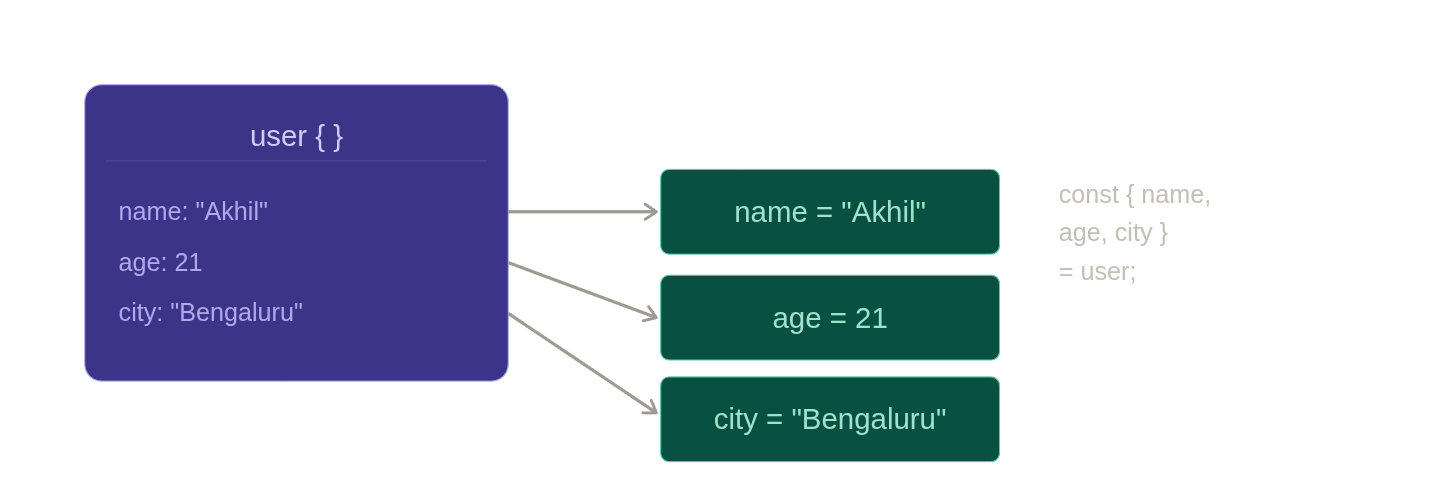
The second diagram above shows this flow — properties come out of the object on the left and land in their own teal variable boxes on the right.
Default Values
Sometimes a value might not exist in the array or object. Instead of getting undefined, you can set a fallback:
const [a = 23, b] = [, 43];
console.log(a); // 23  ← index 0 was empty, so default value prints
console.log(b); // 43
The comma with nothing before it is intentional it's how you skip an index. Since index 0 is empty (undefined), the default value of 23 is used for a.
The same works with objects:
const { name = "Akhil", role = "cohort-student" } = {};
console.log(name); // "Akhil"
console.log(role); // "cohort-student"
One thing worth knowing defaults only activate when the value is undefined. If a property is explicitly set to null, the default will not print.
Destructuring Benefits
It removes repetition. Writing response.data.user.name three times in a function is messy. Destructuring lets you pull out what you need at the top and use clean variable names for the rest of the function.
It makes function parameters readable. This is probably the most practical use case:
// Without destructuring
function greet(user) {
  console.log("Hello, " + user.name + "! You are " + user.age + ".");
}

// With destructuring
function greet({ name, age }) {
  console.log(`Hello, \({name}! You are \){age}.`);
}
Swapping variables becomes a one-liner:
let x = 1, y = 2;
[x, y] = [y, x];
console.log(x, y); // 2 1
Destructuring is one of those features that feels small when you first learn it, but quietly shows up everywhere once you know it. The moment you start working with React props, Express route handlers, or any kind of API data, it becomes second nature. Learn it once, and your code will be cleaner for it


